Posts

Showing posts with the label mobile

TA: Mobile browser - It's all about the touch(start/end)

Image
As we all know, non-touch devices like a desktops have slightly different input from touch devices like mobile. This also means developers do have the option to build a website that does expect touch input instead of a mouse click. If your test suite does do a `element.click` when touch is expected, the click does not fail (at least not currently), so no error is thrown/shown but your script will fail. In one of my previous blog posts I mentioned a solution with execute_script and touchend . I did find out ( with the help of the watir community on Slack ), this can be resolved easier with Selenium and touch action (only supported on Chrome at the moment of writing). The specs In general spec documents are a bit difficult to interpret because of the lack of a clear example, but it gets easier to understand the structure over time. If you look at the specs of selenium-webdriver  you get an overview of all possibilities. There are a couple of points you could look if you think...

What to do if your mobile website requires a tap instead of a click?

Image
Our development team decided that the mobile website only accepts mobile input (tap instead of click) on some elements because that is the actual user behavior. This does mean that if you use watir (I use 6.10.3) or lapis_lazuli (I use 2.1.3), you will have a bit of rework to do for your mobile tests. So let's check out the options and how this was resolved in the test automation suite of Mproof's latest product " Service-Hub ". Image credit: Minuum Intro In one of my previous blogposts I talked about setting up the test automation framework and  setting up a browser session with appium_lib, watir and lapis_lazuli for mobile test automation . Not mandatory to read, but could be handy if you're new to mobile website test automation to get you started.  Appium_lib gem Let's start with the most popular solution. Appium is made for mobile test automation, so if you use the appium_lib gem for ruby you can execute all kinds of touch actions  which is ...

Test Automation on real devices versus emulator/simulator

Image
Emulators and simulators look like a cheap alternative compared to testing on real devices. And that is true if you only look at the value of the device. But it's not per see true if you look at the quality of the test results. In this blogpost I'll show a real life example where testing on an iOS simulator failed to reveil a bug that was present on a real device. Website design (desktop versus mobile) Unlike the desktop (where there is enough space to show everything at once), the mobile view is limited and therefore part of the information is shown at the time. Our website is following Google's Material design as much as possible, so the mobile site works a bit like the Gmail application on your phone. The hamburger menu is visible at first, but when you open an item (like an e-mail in the Gmail app), the menu button transforms into a back button. So when you want to get back to the menu you need to press the back button first. When you do press the back button, the...

TA Basics: Device simulation with lapis_lazuli

Image
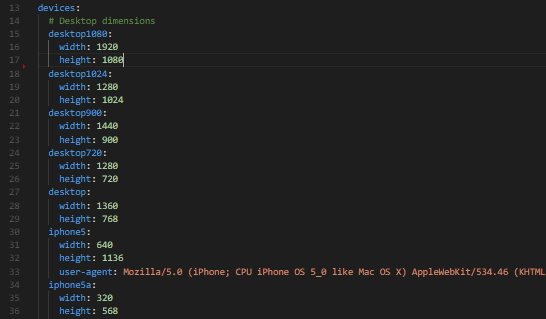
Lapis_lazuli provides a way to simulate a mobile device . But when you want to test on real or virtual desktop and especially mobile devices instead of using this simulation option, here is what you need to keep in mind. Dimensions In the devices.yml file (briefly mentioned in the  previous blog post ), you store all browser width and height dimensions you want to test on. It will look something like this: From the command line you could start a specific run with the command "cucumber DEVICE=desktop720" From IRB or env.rb you could start a browser session with "browser :firefox, device: 'desktop900'" Or you just add a default in the config.yml file "default_device: desktop1024", so you can run the cucumber command or the irb session without the need to enter a specific dimension This even works on remote browsers via selenium grid (just add the device: 'desktop1080' to the capabilities). Problem But there is one issue wit...