Posts

Showing posts with the label LapisLazuli

TA Basics: Test Framework on Linux (or VM)

Image
At some point I messed up my local test automation setup and I thought, maybe I should do the experimental things in a Virtual Machine. So here is a compact manual for a Ubuntu VM. For the VM I'm using the open source software VirtualBox from Oracle. There are plenty of manuals for that around on the internet. So I'm not going to cover how to install Virtual box with Ubuntu.  www.virtualbox.org But what I want to cover in this manual is an editor (Visual Studio Code), Ruby, a set of ruby gems (lapis_lazuli, Watir, Selenium-webdriver) and of course the webdriver itself (Geckodriver). So let's get started. Visual Studio Code installation Download the package from https://code.visualstudio.com/ I downloaded the 32bit debian version from https://code.visualstudio.com/docs/?dv=linux32_deb After that I followed the guide on https://code.visualstudio.com/docs/setup/linux sudo apt install ./<file>.deb Ruby + gems installation In the terminal: su...

TA basics: Making screenshots when scenarios fail

Image
A picture sometimes says more than words. This is also true for test automation. Therefore it could be that you want your framework to make a screenshot when a scenario is failing to make debugging more easy. But how can you make sure your framework does this for you? Since we're using the `lapis_lazuli` gem, this is actually already been taken care off for most scenario's, but if you're using the 'watir' gem, you need to modify your `hooks.rb` file like briefly described on this page . Let's first look at Watir and then move to LapisLazuli to see what advantages and disadvantages are between the two. Watir screenshots Watir by default does not make a screenshot of a failing test, so you need to write some code to make this work. Below a Watir example Keep in mind that this only makes a screenshot at the end of the scenario. Meaning that it can happen that the screenshot is being taken a fraction later and thus missing the real issue. So let's t...

TA Basics: Element selection with the lapis_lazuli gem

Image
In case you've never head of the phrase "All Roads Lead to Rome", it refers to the fact that many routes can lead to a given result. The same counts for finding elements on your website under test. There are many attributes which can be used to find the element you need. So let's have a look at a bunch of functions/options with the `lapis_lazuli` gem to limit the amount of roads a bit but still keep the test reliable. Side note Let's start with something I mentioned in a previous post , but it's good to keep in mind. The ` lapis_lazuli ` gem is an extension build on top of the ` watir ` gem. Even though I focus on LapisLazuli functions, you can also use the Watir way instead to locate the elements or even combine the two to a certain extend. Documentation All LapisLazuli documentation for locating elements can be found on the testautomation.info website. And also on github , but this is less complete. Since most of the element selection information...

Selenium-grid - A simple desktop setup on Windows

Image
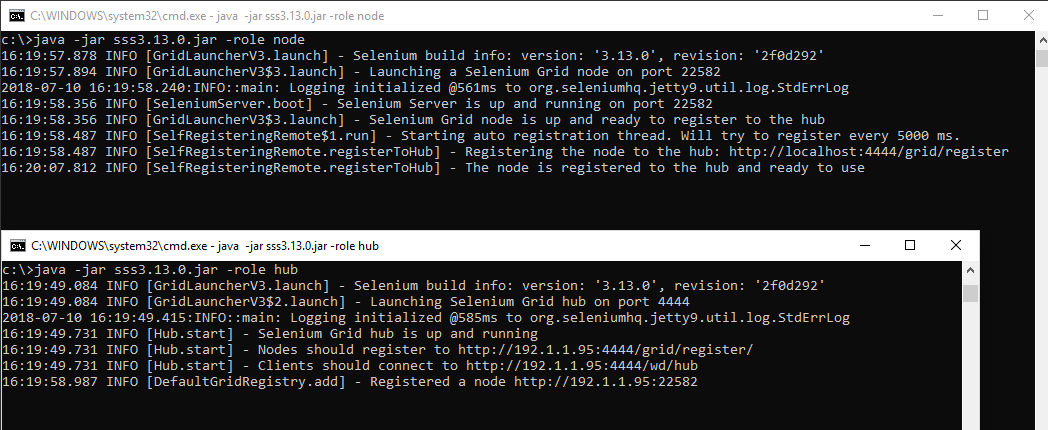
Using a selenium-grid can have many advantages, especially on bigger projects. One such advantage is that you can run many tests in parallel. Another advantage is that you only need to run your tests to one point (the selenium-grid hub). The hub will sort out if it has a connected node that is matching your request and if so, it will serve your tests to that node. Selenium grid Assumptions/preconditions You know how to download and install Java (from java.com ) You know how to download the webdrivers (also previous post) You know how to add a PATH to the PATH variable of Windows (see  Google ) Make sure Java and the webdrivers are in the PATH variable Start the hub Download the Selenium Standalone Server  and run this in the commandline: java -jar <filedir\filename>.jar -role hub Allow the firewall setting if/when this pop's up. Start the node java -jar <filedir\filename>.jar -role node This will just register the node to the hub with so...

TA Basics: Setting up a test automation framework in seconds with lapis_lazuli

Image
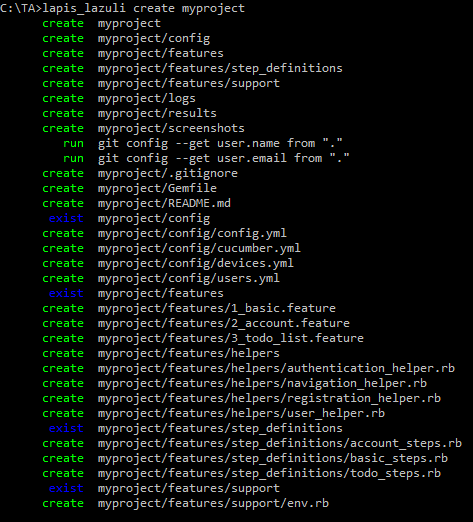
By reading my previous blogposts, you are now ready to start your test automation adventure for real. Ruby is installed, the browser and webdrivers are installed and in place, the lapis_lazuli gem is installed which also takes care of cucumber, selenium-webdriver, watir and some other needed gems, you know how to write scenario's in Gherkin . YES!  You are as ready as you can be. So it's time to get started and see the whole setup in action. Create and run Create a project Some blog's explain all different aspects of the files and folder structure you need for test automation with cucumber. And basically you could just put everything into one *.rb file and run it. But I like to show you a simple way to create an entire working project with one command. And from there you can start modifying it bit by bit which I'll cover later. So lets start with creating a project by going to the command prompt (Windows, which I'll use ) or terminal (OSX/Linux) and t...

PowerShell - Start your tests in parallel

Image
Intro Not long after I started to build the first set of tests for our single page web application, I noticed the time it took to run the tests started to increase quiet fast. I started to read about parallel testing, selenium-grid, which ruby gem I could use and that was all quiet interesting. Luckely I already wrote my tests to run independantly. For parallel testing you need to keep a couple more things in mind than just write independant tests and starting them, but I'll make a part 2 where I'll cover it more in depth. In this post I'll cover the basics for using PowerShell to trigger tests to run in parallel. Setup As mentioned in previous posts we make use of Visual Studio Online (VSO)as a build server and Azure VM's for our Selenium-grid setup. There are multiple ways to go at this, but we use the grid in the following setup. One hub, multiple nodes. The hub machine also has ruby installed and all needed gems. We use the lapis_lazuli gem for our test...

How to deal with browser alerts that require a confirmation with Ruby/Cucumber/LapisLazuli

Image
Recently our website application changed and with that change there was also a check for input fields that were not saved yet (dirtyflag). When you want to close the page while there is an unsaved change on the page, the browser will show you an alert with the options to Leave the page (and loose all changes) or Cancel (and stay on the page). This seems like a small thing to solve. But it seems like it's a bit more difficult to do something with this alert then I initially thought so I'll show you my case and why I needed a small workaround to make sure it was not breaking all my tests. My case I'm testing a one page application, which means I don't deal with a lot of url's. Actually I only have to deal with two url's. The application page https://application.domain.com and the login page https://application.domain.com/login. The disadvantage of a one page application is that you cannot use a url to go to a certain page within the application. You need to...

TA Basics: Website Test Automation on mobile devices via Appium server

Image
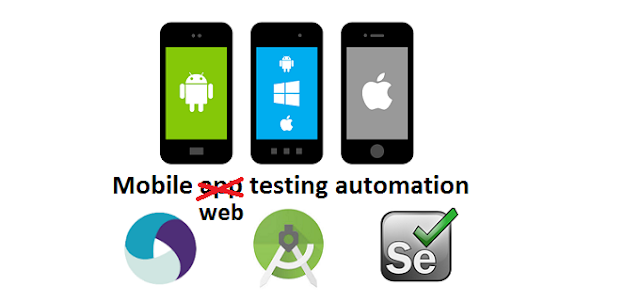
Recently I have been focussing on test automation with mobile devices. Specifically Android and iOS (no Windows phone because that platform is as good as dead at the moment). I first wanted to make a complete manual from setting up software and devices/simulators up to a small test script. But due to lack of time I'll focus on specific parts. If you have any questions reguarding the setup, feel free to contact me. So all that said, let's get to the point. The internet is full of blogposts, video's and examples of people testing mobile apps. However I don't test an app, I want to do some web test automation on mobile devices. It took me quiet some time to figure out what exactly I had to use to get it all to work as needed for my project. Setup Mac mini running OSX 10.13.4 High Sierra (Mac machine is needed for iOS simulation) Ruby version 2.5.0p0 (2017-12-25 revision 61468) [x86_64-darwin17] Appium desktop version 1.4.1 (with Appium server 1.7.2) lapis_laz...