Posts

Showing posts with the label cucumber

TA basics: Making screenshots when scenarios fail

Image
A picture sometimes says more than words. This is also true for test automation. Therefore it could be that you want your framework to make a screenshot when a scenario is failing to make debugging more easy. But how can you make sure your framework does this for you? Since we're using the `lapis_lazuli` gem, this is actually already been taken care off for most scenario's, but if you're using the 'watir' gem, you need to modify your `hooks.rb` file like briefly described on this page . Let's first look at Watir and then move to LapisLazuli to see what advantages and disadvantages are between the two. Watir screenshots Watir by default does not make a screenshot of a failing test, so you need to write some code to make this work. Below a Watir example Keep in mind that this only makes a screenshot at the end of the scenario. Meaning that it can happen that the screenshot is being taken a fraction later and thus missing the real issue. So let's t...

TA Basics: How to use the helper files

Image
When you just start with test automation, you most likely search and interact with elements within your `*_steps.rb` files (the files that contain the precondition, interaction and validation steps). So most likely across the steps, you have repeatedly located and interacted with the same elements a couple of times. And as long as your test suite is small, adjusting it only takes a small bit of time and it works, so who cares, right?  But now imagine you have a 100 scenario's, 100+ (precondition, interaction and validation) steps. And in a bunch of them you've locate the same element. But because of a change in the website this button cannot be found anymore. Are you going to adjust this in every line in your code to fix? Your answer should be: "NO!". You could use nested steps , but this becomes really confusing really fast and is not a good practice. So let's have a look at a proper solution, the helper files. Structure We basically define four main layers i...

TA Basics: Adjust scenario's and steps

Image
You now have this beautifull generated test automation suite and you want to adjust it to your needs, but have no clue where to start. Don't worry, because that is exactly what we're going to cover in the next couple of posts. In this post we'll add a new scenario, make some small adjustments to a step, add a new step and run only that one test to check the results. Cucumber Let's start with a test run with Cucumber. Navigate to the folder in which the tests are stored. So in this case in ` C:\TA\testproject `. In this folder type ` cucumber ` and hit the enter key to run all tests from your generated test suite. But you can also run a limited set of tests. To do so, you should make use of tags in your scenario's . To run only one test you can run it like this ` cucumber -t @whatever `. It will now only run tests that are matching this specific tag and ignore all others.  Add a scenario and run it Let's start with adding a new scenario. For example ...

TA Basics: Setting up a test automation framework in seconds with lapis_lazuli

Image
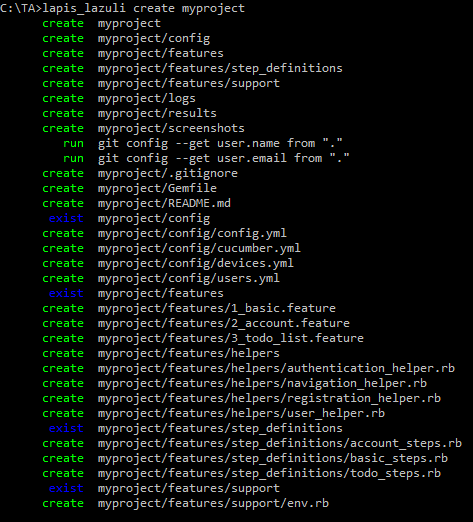
By reading my previous blogposts, you are now ready to start your test automation adventure for real. Ruby is installed, the browser and webdrivers are installed and in place, the lapis_lazuli gem is installed which also takes care of cucumber, selenium-webdriver, watir and some other needed gems, you know how to write scenario's in Gherkin . YES!  You are as ready as you can be. So it's time to get started and see the whole setup in action. Create and run Create a project Some blog's explain all different aspects of the files and folder structure you need for test automation with cucumber. And basically you could just put everything into one *.rb file and run it. But I like to show you a simple way to create an entire working project with one command. And from there you can start modifying it bit by bit which I'll cover later. So lets start with creating a project by going to the command prompt (Windows, which I'll use ) or terminal (OSX/Linux) and t...

TA Basics: Gherkin basics

Image
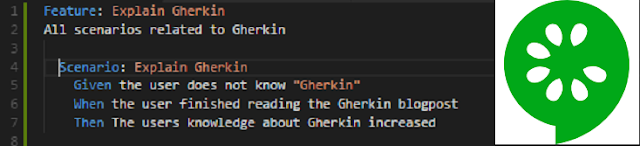
Ruby + Cucumber is utilizing the Gherkin language so users can write scenario's and match them to actual scripts. The Cucumber + Gherkin combo is a widely used standaard among test automation engineers, but it has nothing to do with vegitables. So what is it? How to use it? And how to use it properly?/lessons learned. What is Gherkin (and Cucumber)? Let's start with the definition that is mentioned on the Cucumber(software) wikipedia page .  "Gherkin is the language that Cucumber uses to define test cases. It is designed to be non-technical and human readable, and collectively describes use cases relating to a software system." So not only do you write your test cases in a way even a non-technical person can read and understand what the test is actually doing. It can also be used as documentation. An example of how to write test cases using the Gherkin language you see in the picture of this post. This documentation on it's own does not execute anyt...

How to deal with browser alerts that require a confirmation with Ruby/Cucumber/LapisLazuli

Image
Recently our website application changed and with that change there was also a check for input fields that were not saved yet (dirtyflag). When you want to close the page while there is an unsaved change on the page, the browser will show you an alert with the options to Leave the page (and loose all changes) or Cancel (and stay on the page). This seems like a small thing to solve. But it seems like it's a bit more difficult to do something with this alert then I initially thought so I'll show you my case and why I needed a small workaround to make sure it was not breaking all my tests. My case I'm testing a one page application, which means I don't deal with a lot of url's. Actually I only have to deal with two url's. The application page https://application.domain.com and the login page https://application.domain.com/login. The disadvantage of a one page application is that you cannot use a url to go to a certain page within the application. You need to...

WTA with Ruby - A high level view of how it works

You're most likely already familiar with manual testing and different tools and techniques, but manual testing (especially when done repetitive) becomes a very boring task very quick. Also it might be way more efficient to use test automation for repetitive tasks or the ones that are difficult to perform manually. So you want to look into test automation. What do you do? Where do you start? Scripting/Programming Language There are so many tools and languages to use that it's difficult to choose. Usually you start with what is already available in your company, or something that makes sense to use for your project. But if you can start from scratch and there is nothing available in your company and you have no preference for any programming/scripting language, why not start with Ruby . In my experience it was fairly easy to get used to, without to much programming knowledge. Tools Then there is still the task to choose a tool to script for. For website test automation t...

Website Test Automation with Ruby - A Beginners Guide (blog forecast)

Image
The past During my time at spriteCloud I got my first experience with Test Automation. A crash course in test automation and some days later, I started to write some Gherkin scenario's and test scripts for my own project. SpriteCloud developed a Ruby gem called lapis_lazuli. If you're not familiar with Ruby, it's a plug-in/add-on/extension. This lapis_lazuli gem makes life easier especially for beginners, but I'll explain more about that in one of the next blog posts. The present These days I work for Mproof  to test their new product called Service-Hub . And I'm no test automation master (yet), but I've gained quiet some experience by now and are quiet familiar with the Ruby + Cucumber combination. Still almost every day I learn something new. So I thought it would be nice to share. For you and for me Since the internet is a bit of a jungle of information. You will easily loose time researching an issue that has already been encountered/resolved be...