Posts

TA Basics: Adjust scenario's and steps

Image
You now have this beautifull generated test automation suite and you want to adjust it to your needs, but have no clue where to start. Don't worry, because that is exactly what we're going to cover in the next couple of posts. In this post we'll add a new scenario, make some small adjustments to a step, add a new step and run only that one test to check the results. Cucumber Let's start with a test run with Cucumber. Navigate to the folder in which the tests are stored. So in this case in ` C:\TA\testproject `. In this folder type ` cucumber ` and hit the enter key to run all tests from your generated test suite. But you can also run a limited set of tests. To do so, you should make use of tags in your scenario's . To run only one test you can run it like this ` cucumber -t @whatever `. It will now only run tests that are matching this specific tag and ignore all others.  Add a scenario and run it Let's start with adding a new scenario. For example ...

What to do if your mobile website requires a tap instead of a click?

Image
Our development team decided that the mobile website only accepts mobile input (tap instead of click) on some elements because that is the actual user behavior. This does mean that if you use watir (I use 6.10.3) or lapis_lazuli (I use 2.1.3), you will have a bit of rework to do for your mobile tests. So let's check out the options and how this was resolved in the test automation suite of Mproof's latest product " Service-Hub ". Image credit: Minuum Intro In one of my previous blogposts I talked about setting up the test automation framework and  setting up a browser session with appium_lib, watir and lapis_lazuli for mobile test automation . Not mandatory to read, but could be handy if you're new to mobile website test automation to get you started.  Appium_lib gem Let's start with the most popular solution. Appium is made for mobile test automation, so if you use the appium_lib gem for ruby you can execute all kinds of touch actions  which is ...

Test Automation on real devices versus emulator/simulator

Image
Emulators and simulators look like a cheap alternative compared to testing on real devices. And that is true if you only look at the value of the device. But it's not per see true if you look at the quality of the test results. In this blogpost I'll show a real life example where testing on an iOS simulator failed to reveil a bug that was present on a real device. Website design (desktop versus mobile) Unlike the desktop (where there is enough space to show everything at once), the mobile view is limited and therefore part of the information is shown at the time. Our website is following Google's Material design as much as possible, so the mobile site works a bit like the Gmail application on your phone. The hamburger menu is visible at first, but when you open an item (like an e-mail in the Gmail app), the menu button transforms into a back button. So when you want to get back to the menu you need to press the back button first. When you do press the back button, the...

Android statistics: May 2018

Image
It's not long ago that I posted about the Android statistics of April 2018 , but new statistics have been released by Google, so it's time for an update. https://developer.android.com/about/dashboards/ Statistics, facts and trends Versions over time Click to expand versions over time image. Facts about the Android versions compared to previous month: Android 8.1, 8.0 and 7.1 are increasing in market share Android 7.0 is stabilizing and will not increase much further, if at all Android 6.0 and 5.1 are decreasing in market share with +- 1% per full month Android 5.0 and 4.4 are decreasing as well, but at a lower pace Codenames over time Click to expand codenames over time image. Facts about the Android codenames compared to previous month: Android Oreo has a steady increase in market share Android Nougat is reaching the top but is still increasing slowly Android Marshmallow and Lollipop have a steady line downwards It will take +- 1 year...

Prepare your Mac for (mobile) test automation

Image
The Mac mini I use for mobile test automation got stuck at booting up after an update of OSX (thanks Apple) and there was no way to recover (I didn't have a time machine backup). Maybe I could have found a clever way to restore access to the Macintosh HD, but I decided to just go for the reinstall instead and make it a bit more detailed this time than in one of my previous blogposts. Installations OSX updates (1) First make sure you have installed all OSX (security) updates. Via the app store > updates > check for updates. Install Xcode Navigate to the App Store  Search for Xcode  Login with Apple ID  Get/Install (if asked, also install the command line tools) `xcode-select -p` will show the current path. To change it, you can do what they also described on this Appium GitHub topic: sudo xcode-select -s /Applications/Xcode.app  Quit Appium, Restart Appium and try again Install Android Studio Download the installer Open the dmg...

TA Basics: Device simulation with lapis_lazuli

Image
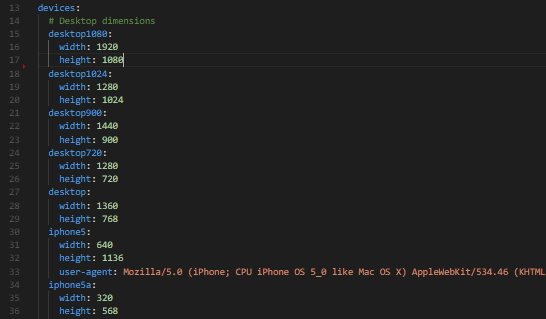
Lapis_lazuli provides a way to simulate a mobile device . But when you want to test on real or virtual desktop and especially mobile devices instead of using this simulation option, here is what you need to keep in mind. Dimensions In the devices.yml file (briefly mentioned in the  previous blog post ), you store all browser width and height dimensions you want to test on. It will look something like this: From the command line you could start a specific run with the command "cucumber DEVICE=desktop720" From IRB or env.rb you could start a browser session with "browser :firefox, device: 'desktop900'" Or you just add a default in the config.yml file "default_device: desktop1024", so you can run the cucumber command or the irb session without the need to enter a specific dimension This even works on remote browsers via selenium grid (just add the device: 'desktop1080' to the capabilities). Problem But there is one issue wit...

TA Basics: Setting up a test automation framework in seconds with lapis_lazuli

Image
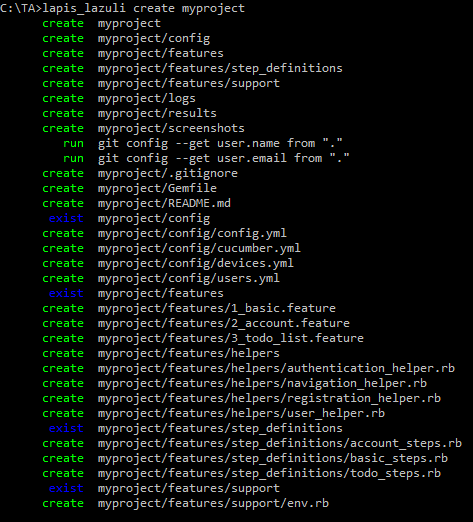
By reading my previous blogposts, you are now ready to start your test automation adventure for real. Ruby is installed, the browser and webdrivers are installed and in place, the lapis_lazuli gem is installed which also takes care of cucumber, selenium-webdriver, watir and some other needed gems, you know how to write scenario's in Gherkin . YES!  You are as ready as you can be. So it's time to get started and see the whole setup in action. Create and run Create a project Some blog's explain all different aspects of the files and folder structure you need for test automation with cucumber. And basically you could just put everything into one *.rb file and run it. But I like to show you a simple way to create an entire working project with one command. And from there you can start modifying it bit by bit which I'll cover later. So lets start with creating a project by going to the command prompt (Windows, which I'll use ) or terminal (OSX/Linux) and t...

Android statistics: April 2018

Image
Some time ago I started to share Android statistics and predictions and I still keep track of these statistics. At my previous employer I also had to report on this, so I created some blogposts on their website instead of here. So I thought it might be interesting to start sharing this information again. I'll share my reasons to support or skip a certain version on the long and short term. Obviously the support you want to give for your app/website is depending on your customers and not per see on these statistics.  https://developer.android.com/about/dashboards/ Data collected during a 7-day period ending on April 16, 2018.  Any versions with less than 0.1% distribution are not shown. Statistics I'm skipping the numbers for Android Jelly Bean and earlier (4.3 and earlier). The reason I left these out is due to the fact that there market share really does not matter anymore. And there are so many lines in these graphs that it is more clear this way. In case your ap...

TA Basics: Gherkin basics

Image
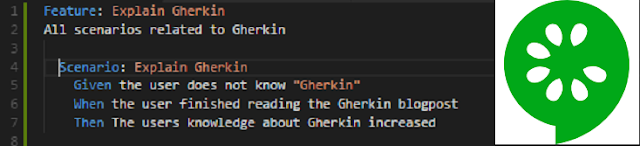
Ruby + Cucumber is utilizing the Gherkin language so users can write scenario's and match them to actual scripts. The Cucumber + Gherkin combo is a widely used standaard among test automation engineers, but it has nothing to do with vegitables. So what is it? How to use it? And how to use it properly?/lessons learned. What is Gherkin (and Cucumber)? Let's start with the definition that is mentioned on the Cucumber(software) wikipedia page .  "Gherkin is the language that Cucumber uses to define test cases. It is designed to be non-technical and human readable, and collectively describes use cases relating to a software system." So not only do you write your test cases in a way even a non-technical person can read and understand what the test is actually doing. It can also be used as documentation. An example of how to write test cases using the Gherkin language you see in the picture of this post. This documentation on it's own does not execute anyt...

TA Basics: Selenium Webdrivers

Image
Intro  In one of my previous blog posts, I talked about a high level view of the whole test automation setup . It happens quiet often that people that begin with test automation forget to install the webdriver or are working with an older version of the webdriver. So in this post I wanted to go over this specific part and show some examples when testing local, with selenium-grid or via appium. What are webdrivers? In short I'd say: "Webdrivers are the bridge between your test automation framework and the browser. It can mimic user behavior on the browser so that your test script perform actions like a user would do".  How does it work?  The high level view of the flow is very straight forward. Your test scripts talk to Selenium, Selenium talks to the webdriver of your needs, the specific webdriver talks to the browser. So this means you need all components. The browser, the browser specific webdriver, selenium and a program language that is supported...